Readme Creation

Introduction

This section introduces the Readme Creation function in Readme Improvement tab.
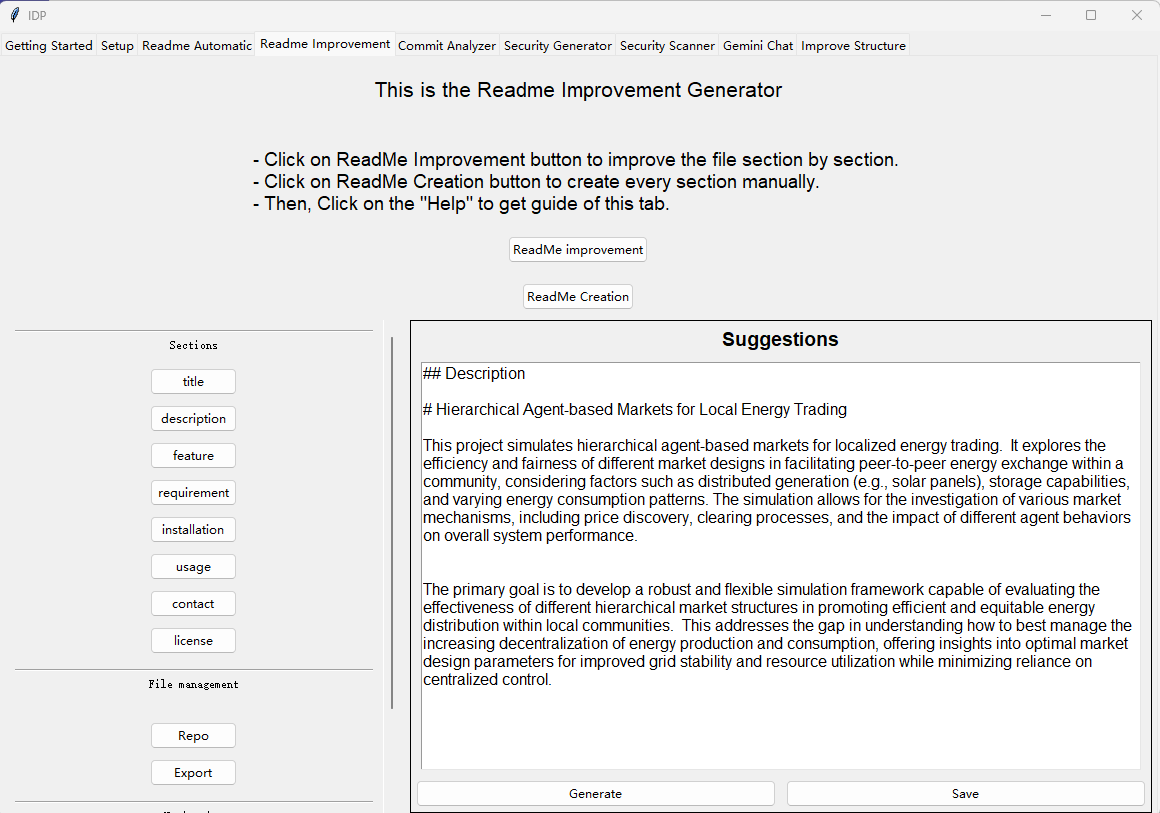
../_images/Readme_creation.png

Left Frame: Sections Button

You can choose which sections you want to include in your README.

This tool provides templates for the following sections: Title, Description, Feature, Requirement, Installation, Usage, Contact, and License.

Title: Enter the name of your repository.

Description: Provide a brief description of the repository. You can also enter a few words or phrases to describe its purpose.

Feature: List the key features of your repository. If you’re unsure what to write, click Generate to let the LLM create a draft for you. You can also add or remove fields in this popup.

Requirement: List the required software or dependencies (e.g., gurobi).

Installation: Specify the required IDE, package manager, Git address, and any other installation instructions.

Usage: Explain how to run or use the program.

Contact: Provide your name, email address, and personal website (if applicable).

License: Choose one license from the following options: - MIT License - GNU License - Apache License

Left Frame: File Management Buttons

Repo: Generates a file tree to help the LLM understand the structure of your repository. You can control the depth of the file tree and choose whether only folder names are included.

Export: Once you have refined and saved all sections, you can export the complete README. The LLM will compose all the refined sections into a valid Markdown README file. After generation, a popup will ask where to save the new file. In the popup, you can also rearrange the order of the sections.

Left Frame: Navigation Buttons

Help: Displays simple instructions for using this tab.

Back: Returns to the main tab.

Right Frame: Suggestions

This frame displays the LLM-refined version of the README section.

You can edit the suggestion manually. Don’t worry about formatting—the Export function will let the LLM compile all refined sections into a well-formatted Markdown README.

Generate: Use the LLM to refine the selected section.

Save: Save the refined section if you are satisfied with the result.